Why front camera selfies look mirrored
When you take a selfie, the screen shows a mirror image of you. That is deliberate: you have spent your whole life looking at yourself in mirrors, so a mirrored preview feels natural and makes it easy to frame the shot. Raise your right hand and the hand on the right of the screen moves, just like in a bathroom mirror.
What happens after you press the shutter depends on the phone and the app. Some cameras save the photo mirrored, exactly as previewed. Others flip it back and save what the camera really saw, the way a friend standing in front of you would see you. Many social apps make their own choice again. That is why the same selfie can look right in one place and reversed in another.
How to unmirror a selfie
Unmirror selfie photos in three taps. This page opens with Horizontal selected, the direction that fixes a mirrored selfie:
- Tap Choose images and pick the selfie from your photo library. iPhone HEIC photos work.
- Look at the preview. Text should now read normally; tap Show original to compare the two versions.
- Tap Save to Photos (on phones that support it) or Download. The photo keeps its full resolution and is saved as a new file, so the original stays in your library.
Backwards text in a mirror photo
The clearest sign of a mirrored selfie is writing: a logo on your shirt, a street sign, a book cover or a name badge reads from right to left. Flipping the photo horizontally is the only fix. Rotating it does not help, because the letters themselves are reversed.
Hair partings, moles, watches and rings move to the other side too. Nobody notices those in a single photo, but they matter for things like a profile picture that sits next to other photos of you, or a product shot where a brand name must be readable.
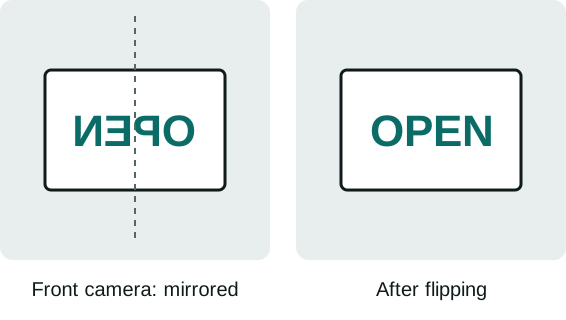
Why the unmirrored selfie can look strange
Many people flip a mirrored selfie and dislike the result, even though it is the version everyone else sees. Faces are never perfectly symmetric, and the face you know best is the one in the mirror. Psychologists call the preference for the familiar the mere-exposure effect: you like your mirror face because you have seen it thousands of times, while your friends prefer the true one for the same reason.
So which version should you keep? If there is text in the photo, unmirror it. For a mirrored selfie without text, it is a matter of taste. For a professional headshot or an ID-style photo, use the unmirrored version, because that is how colleagues will see you in person.
Stop your phone from mirroring selfies
If you would rather fix this at the source, check the camera settings:
iPhone
Open Settings, then Camera, and look for Mirror Front Camera. With it on, selfies are saved mirrored, exactly like the preview. With it off, the iPhone saves the unmirrored view. The setting only affects new photos, so use the tool above for selfies you have already taken.
Android
Android camera apps differ by brand. Open the camera app's settings and look for an option about saving selfies as previewed or mirroring the front camera. If your phone has no such option, flip a selfie after taking it with this page.
Private by design
Selfies are personal, so this tool never uploads them. The photo is opened and flipped inside your browser, and the result is saved straight back to your phone. There is no account, no watermark and no copy kept anywhere. The same tool can also turn a picture upside down on the flip image page, and the mirror image home page explains the symmetry effect.
Flip a selfie FAQ
How do I unmirror a selfie on iPhone?
Open this page in Safari, tap Choose images, pick the selfie, keep Horizontal selected and tap Save to Photos. To stop future selfies being mirrored, switch off Mirror Front Camera in Settings, Camera.
Why does my selfie look different from the mirror?
A mirror and the selfie preview both show you reversed, so a mirrored selfie matches what you see every morning. If the saved photo is unmirrored, you see your face the way others do, which looks slightly off because you are used to the mirror version.
Will flipping my selfie lower the quality?
The resolution stays the same. The photo is saved as a high quality JPG (92 by default), and you can raise the quality slider to 100.
Is my selfie uploaded?
No. The flip happens in your browser and the photo never leaves your device. See the privacy policy.
Can I flip several selfies at once?
Yes. Pick up to 30 photos together; they are all flipped the same way and download as one ZIP file.